Saturday, 18 April 2020

C++ Array


Array:-       
               An Array is a collection of multiple values of same type at a contiguous memory locations. In an array we can collect the data. For example if we need to store a class data then we can use an array. If there are 26 students in mechanical branch and we have to store marks of these students then we can create an array of size 26 of same data type i.e int, float, double, char etc.

Declaring Array:-    An array can be declare as follow  :-
  
return type arrayname [aray size];

Int mech[26];

Here Data type :- int
         Array name:- mech
         Size:-26
Here we declare an array of name mech where data type is of integer (int ) and total size is 26.

Initialization of array:- Array can be initialize during declaration of array (without loop) as follow:-
  
Int mech[5]={20,40,50,70,80};

In an array data can be store through an index ,according this first element start from 0 to n-1 if the total size is n.
mech[0]= 20
mech[1]= 40
mech[2]= 50
mech[3]= 70
mech[4]= 80

Accessing array element:-

As we know array elements can be access through index.
If we need to input the data in an array ( int mech[5] ) then there is a loop  :-

for(i=0;i<=4;i++)
{
cin>>mech[i];
}

If we need to display the data in an array ( int mech[5] ) then there is another loop  :-

for(i=0;i<=4;i++)
{
cout>>mech[i];
}

In an array we can also input and output or display the data individually. For example

cin>>mech[2]

that mean we are going to input the value in 3rd element of array mech.

cout<<mech[4]

that mean we are displaying the data of 5th element.   


Thursday, 17 November 2016

Array with structure


      Structure may consist of one or more arrays as its elements. As we know when we need to store list of elements, then we can use array. In this case the elements of structures of a specified type.

Example of arrays of structure:

struct student
{

int marks[6];

long rollno;

} s;

In above example structure student it contains one arrays as structure member marks. Where it can store the marks of 6 students.

Program:- 


Output:


Write a program to calculate area of circle with structure and function

Coding:-
                      Structure can be used with the functions in c++ by passing whole structure as an argument to a function.


Output:- 


Saturday, 5 November 2016

Operators in C++

Operator:- 
               An Operator is a symbol that specifies an operation to be performed.These operators are used in different combinations to form expressions. For example "+ " is a addition operator that add two digits. The data items on which the operators act upon are called operands.

There are a list of operators in c++ programming language.

- Assignment operator.
- Arithmetic operator.
- Relation operator.
- Logical operator.
-Increment - Decrement operator.


1:- Assignment operator:-

                                                    " =" symbol is known as assignment operator. Assignment operator is used to assign a value to any variable.For example. " a=5". mean 5 is assign to a variable or value of a is now 5.

2:- Arithmetic operator :-   
       
                                            Arithmetic operator are used to perform arithmetic operation. simple mathematical operation comes under this operator like subtraction, addition, multiplication, and division. Various symbol under arithmetic operation are:-


Symbol
Meaning
Example
+
Addition
a+b  (2+2)
-
Subtraction
a-b   (2-2)
*
Multiplication
a*b  (2*2)
/
Division
a/b  (2/2)
%
Modulus/ Reminder
a%b (2%2)


  These are five symbol under arithmetic operator in which "+" symbol is used to add to operands like in example  [2+2 =4]. Subtraction "-" used to subtract two operands for example [2-2=0]. Multiplication [*] used to multiply two operands for example [2*2= 4]. Division [/] is to divide two operands for example [2/2=1].Modulus or reminder operator "%" provides reminder. for example [2%2=0].  

3:-Relation Operator:-
                                        The relation operator is used for comparison between two or more operands.It check the relation between two operands.


Symbol
Meaning
Example
< 
Less then
a<b
> 
Greater then
a>b
<=
Less then equal to
a<=b
>=
Greater then equal to
a>=b
==
Equal to
a==b
!=
Not equal to
a!=b


4:- Logical operator:- 
                                        The logical operator are used to compare the one or more Boolean expression and return the result in Boolean. C++ provide following Logical operator:-

                                 &&              (AND)

                                   ||                 (OR)

                                   !                 (NOT)

                 The result of the comparison is either TRUE (1) or FALSE (0).

5:-Increment and Decrement operator:-

                                                                         In c++ , the other unary operator are ++(increment operator) and --(Decrement operator). These operates only one one operands. the ++ and -- operators here have been written after the variable they apply to, in which case they are called the post increment  and post decrement operators. there are also pre increment and pre decrement operator.       
                     Increment operator (++) increase the value of variable by 1.
                     Decrement operator(--) decreases the value of a variable by 1.


Friday, 28 October 2016

Write a program in c++ to read and write in structure.

Coding:- 
               
#include<iostream.h>


struct ank
{
long int sal;
long int age;

}  var ;

main()
{

cout<<" enter salary of ank =";
  cin>>var.sal;
cout<<"what is the age of ank =";
  cin>>var.age;

  cout<<" salary of ank = "<<var.sal;

  cout<<"\nage of ank ="<<var.age;


}

Output:-


Write a program in c++ to read and write in structure .


Coding:-
#include<iostream.h>


struct ank
{
long int sal;
long int age;

};

main()
{
struct ank var;

cout<<" enter salary of ank =";
  cin>>var.sal;
cout<<"what is the age of ank =";
  cin>>var.age;

  cout<<" salary of ank = "<<var.sal;

  cout<<"\nage of ank ="<<var.age;


}


Output:-


Structure in c++:-

Structure:- 
                  Structure is a collection variables of different data items under a common name .Some can be  int, some can be float, some can be char and so on. In this case the data item of structure is called member of that structure.
           
                  The difference between array and structure is that array is a collection of same type elements that are referred by a common name but in case of structure element of structure can be of different type.

Declaration of Structure:-
   
     Syntax:- 
                        struct structure name
                   
                                                {

                                       data- type 1 member1;
                                       data- type 1 member2;
                                       data- type 1 member3;
                                       -------------------
                                       -------------------
                                       data-type n member n;
                             };
example:-
                               struct student                  
                                                {

                                       char name[10];
                                       int rollno;
                                       char branch[10];
                                       int sem;  
                             };

Creating structure variable:- 

                                   If you need to access the data member of Structure , so you have to declare a structure variable. That can access data member of structure. There are various ways to access these member functions.We can create more then one structure variable.
 
I)                               We can create structure variable at the time of declaration. Structure variable(s)  can be declared after defining the structure type.

                           struct structure name
                   
                                                {

                                       data- type 1 member1;
                                       data- type 1 member2;
                                       data- type 1 member3;
                                       -------------------
                                       -------------------
                                       data-type n member n;
                             } structure variable(s);

Example:-
                     
                               struct student                  
                                                {

                                       char name[10];
                                       int rollno;
                                       char branch[10];
                                       int sem;  
                             }var ;        

Program:-

Write a program in c++ to read and write in structure 


II) We can also create a structure variable with in a main function.

Example:-
                         
                          struct student                  
                                                {

                                       char name[10];
                                       int rollno;
                                       char branch[10];
                                       int sem;  
                             } ;

                      main()

              {
                       struct student var;
                            ----
                             -------
                      }
Program:-

Write a program in c++ to read and write in structure 


Accessing Structure Elements:-
                         
To access member of structure we have to use the . (dot) operator.

 syntax:-
                     structure_variable_name.member

- If you need to read a statement from keyboard then we have to write down the following statement:-
     cin>>var.rollno;

In which var is a structure variable and rollno is a member of structure as we declare above. Remember the .(dot)operator between structure variable and member of structure.

- If you need to print a statement then write down the following statement :-

   cout<<var.rollno;

 In which you can see that it will print rollno that you entered before.


Monday, 18 May 2015

Write a program in c++ which read two matrix and then print a matrix which is addition of these two matrix.

Coding:- 

                    #include<iostream.h>

void main()

{
 int a[2][3],b[2][3],c[2][3];

 int i,j;

 cout<<"enter values in first matrix  \n";
 for(i=0;i<=1;i++)
 {

for(j=0;j<=2;j++)
cin>>a[i][j];


 }
cout<<"the matrix is : \n";

 for(i=0;i<=1;i++)
 {

for(j=0;j<=2;j++)
 cout<<"  "<<a[i][j];

 cout<<"\n";


 }
   
 cout<<"enter values in 2nd matrix  \n";
 for(i=0;i<=1;i++)
 {

for(j=0;j<=2;j++)
cin>>b[i][j];


 }
cout<<"the matrix is : \n";

 for(i=0;i<=1;i++)
 {

for(j=0;j<=2;j++)
 cout<<"  "<<b[i][j];

 cout<<"\n";


 }
           for(i=0;i<=1;i++)
 {

for(j=0;j<=2;j++)

 c[i][j]=a[i][j]+b[i][j];

cout<<"\n";

}

         cout<<"the sum of two matrix is: = \n" ;

         for(i=0;i<=1;i++)
 {

for(j=0;j<=2;j++)
 cout<<"  "<<c[i][j];

 cout<<"\n";
} }


Output:-   


Write a program in c++ to input the value in two dimensional array and print all the elements in matrix form.

Coding:- 


#include<iostream.h>

void main()

{
 int a[2][4];

 int i,j;

 cout<<"enter values in an array  \n";
 for(i=0;i<=1;i++)
 {

for(j=0;j<=2;j++)
cin>>a[i][j];


 }
         cout<<"the array is : \n";

     for(i=0;i<=1;i++)
 {

for(j=0;j<=2;j++)
 cout<<"  "<<a[i][j];

 cout<<"\n";


 }
}

Output:- 


Write a program in c++ which initialize a two dimensional array and print all the elements in matrix form.

Coding:- 


#include<iostream.h>

void main()

{
 int a[2][3]={1,2,3,4,5,6,7,8};

 int i,j;

 cout<<"the array is : \n";
 for(i=0;i<=1;i++)
 {

for(j=0;j<=2;j++)
cout<<"  "<<a[i][j];
cout<<"\n";

 }

}

Output:-


Write a Program in c++ which read 6 no. from keyboard and store these no into array and then calculate sum of these no. using function.

Coding:- 

 #include<iostream.h>
 int sum (int a[])
 {
int n=0;
for(int i=0;i<=5;i++)
n=n+a[i];
return (n);
 }

 int output(int a[])

 {
cout<<"the elements of array are : "<< endl ;

for(int i=0;i<=5;i++)

cout<<a[i]<<endl;

 }

 int main()

 {
 int a[6],s,i;
 cout<<"enter 6 elements : ";
 for(i=0;i<=5;i++)
 cin>>a[i];

 output(a);

 cout<<"sum of array element is : ="<<sum(a)<<endl;


 }

Output:- 
   

Write a Program in c++to input the marks of five students in an array and then print all the marks.

Coding:- 

  #include<iostream.h>
void main()
{
 int marks[5] ;
int i;


 cout<<"enter marks of five students ";

 for(i=0;i<=4;i++)
 {
cin>>marks[i];
 }


cout<<"the marks of students are: \n";

 for(i=0;i<=4;i++)

 cout<<"marks of " << i+1<<"student is :" << marks[i]<<endl;


}

Output:- 


Write a Program in c++ which store the marks of five students in an array and then print all the marks.

Coding:- 


    #include<iostream.h>
void main()
{
 int marks[5]= {50,60,70,80,90};
int i;

 cout<<"the marks of students are: \n";

 for(i=0;i<=4;i++)

 cout<<"marks of " << i+1<<"student is :" << marks[i]<<endl;


}

Output:- 


Write a Program in c++ for function Overloading.

Program:- Find the volume of cylinder, cube and rectangular box.

Coding:- 

                     #include<iostream.h>


float volume(float r, float h)
{
float vol;
vol= 3.14*(r*r)*h;
return vol;

}


float volume(float s)
{
float vol;
vol=s*s*s;
return vol;

}

float volume (float l, float b, float h)

{
float vol;
vol=l*b*h;
return vol;
}


void main()

{
float radius, side , length, breadth, height , vol;
int option;
 do{
cout<<" \n enter 1 for cylinder, 2 for cube, 3 for rectangular box and 4 for exit ";

cin>>option;

switch(option)
{
 case 1 :    cout<<"enter the value of radius and height of cylinder\n";
 cin>>radius>>height;
 vol=volume(radius, height);
 cout<< "volume = "<<vol<<" cubic units \n";
break;

case 2: cout<<"enter the value of side \n";
cin>>side;
vol=volume (side);
cout<<"\n volume  = "<<vol<<" cubic unit";
break;


 case 3: cout<<" enter the value of length, breadth and height ";
cin>>length>>breadth>>height;
vol=volume(length,breadth,height);
cout<<"\n volume  = "<<vol<<" cubic unit";
break;

default:  cout<<"invalid entry ";
break;

}


}  while (option>0 && option< 4);

}

Output:- 

Wednesday, 13 May 2015

Write a Program in C++ which calculates the factorial of a number using recursion.

Coding:- 

#include<iostream.h>

int fact (int n)

{
int value=1;

if(n==1)

return(value);

else
{
                               value=n*fact(n-1);
                                return(value);
}

}
main()

{
int fact(int);

int f, n;

cout<<"enter a number=";

cin>>n ;

f=fact(n);

cout<<"factorial of a number is ="<<f<<"\n";


}

Output:-


Write a Program in C++ to generate first n fibonacci terms .

Write a Program in C++ to generate first n fibonacci terms .

Coding:-


                      #include<iostream.h>
 
int fib (int );                  //function prototype
main()

{
int n,i;

cout<<"how many fibonacci terms you want ? \n";

cin>>n;

cout<<"fibonacci terms are \n";

for(i=1;i<=n;i++)

cout<<fib(i);                //function calling

}

int  fib (int n)                    //function definition

{
 if (n==1)

return(0);

else
{
 if (n==2)

return(1);
else

return(fib(n-1)+fib(n-2));


}

}

Output:-


Calling Functions

How to Call a function:-  

-  In c++ programs, Functions can be invoked by two method:

- Call by Value.

- Call by reference method.

1:- Call by Value:-
                               In this call by method the value of actual parameter that are appearing in the function call are copied into the formal parameters which are appearing in function definition.

 The following Program illustrates this concept:-

Program:- Calculate of simple interest using a function.

Coding:-


#include<iostream.h>


int simpleinterest(float p, float r, float t);  // function prototyping
main()
{
float principal, rate , time;

cout<<" enter value of principal, rate and time";

cout<<"\n principal = "  ;
cin>>principal;

cout<<" \n rate = ";

cin>>rate;

cout<<"\n time = ";
cin>>time;

simpleinterest(principal,rate,time);    // function calling


}

int simpleinterest(float p, float r, float t)     // function definition

{
 float interest;

interest=(p*r*t)/100;

cout<<"\nSimple interest ="<<  interest;

}

Output:-


2:- Call by Reference:- 
                                         A reference provides an alternative name for the variable, i.e the same variable's value can be used by two different names that is the original name and the alternative name. In this call by reference method, a reference method, a reference to the actual arguments in the calling program is passed. so their the called functions does not create its own copy of the original values but works with the original values with different name.

The following program illustrates this concept:

Program:- Write a program for swapping of two numbers using function call by reference method.

Coding:-


 #include<iostream.h>

         int swap(int & a,int & b);                                    // function prototype

              main()
 {
 int n1 , n2;

 cout<<"enter two values";


 cout<<"\n num 1=  ";
 cin>>n1;

 cout<<"\n num 2=  ";
 cin>>n2;

 cout<<"\n before swapping n1 = "<<n1;
 cout<<"\n before swapping n2 = "<< n2;

 swap(n1, n2);                                                  // function calling

 cout<<"\n after swapping n1 ="<<n1;

 cout<<"\n after swapping n2 "<<n2;


}

int swap(int & a,int & b)                                     //function definition

{
int temp =a;

a=b;

b=temp;

}

Output:- 


Introduction Of Function

Function:- 
                  A function in c++ groups a number of program statements into single unit and gives it a name. This unit or part of function can be called from the other parts of the program.

Advantages of functions in c++:-

1- A complex program can be divided into small sub tasks and functions subprograms can be written for each.

2- They are easy to understand.

3- It has the facility to defining a function in terms of itself i.e, recursion.

4- A function can be utilized in many programs by separately compiling it and loading them together.

 Syntax :-

                     type  name_of_function(parameter passing)

                    {
                             Body of the function

                         }

:- Program to display general message using functions:-


 #include<iostream.h>

 void main()
 {


 void displaymsg();    // Function Prototype


 displaymsg();        // Function Call


 }

void displaymsg()    // Function Definition

 {

 cout<<"welcome to the function part in c++ programming language" ;


 }

Output:-


-Function Prototype:-
                                      It is necessary to declare a function before its use, if your are using main part before function. it tell the compiler that the function would be referenced at a later stage in the program. It could be in main function or it could be outside the main function.

Syntax:-      
                      type name_of_function(parameter passing)

example from above program:-        void displaymsg();

Actual Parameter-  Actual Parameter are the variables  that are provided in the function call.

Formal Parameter- Formal Parameter are the variables that are provided in the function definition.


Recursion:-
                      In C++, a function can call itself, this is called recursion. A function is said to be recursive if there exists a statement in its body for the function call itself.

There are two program that illustrates the use of recursion:-

Write a Program in C++ to generate first n fibonacci terms .

-Write a Program in C++ which calculates the factorial of a number using recursion.

- Function Overloading:- Overloading means to use the same thing for different purposes. In C++, an overloaded function refers to a function having one name and more than one different meanings. So by using overloading functions we provide the same name for several functions.

There is a Program that illustrate the use of function Overloading.

- Write a Program in c++ for function Overloading.


Wednesday, 29 April 2015

Programs Collection of C++ Language

BEGINNING WITH C++ PROGRAM : 

There is some basic programs collection of c++ with there output. The best way to learn about programming language is by writing programs. There i had already discussed about the structure of c++ program (i.e Basic Structure Of C++ Program.).

 Basic Programs for beginning of c++ :

-Write a Program in C++ for Arithmetic Operation.

-Write a Program in C++for Addition of Two Numbers.

-Write a Program in C++ for Arithmetic Operation with different Values.

-Write a Program in C++ to Find the Area of Circle of given Radius.

Control Statements Programs:-

Write a Program in C++to Find the Greatest one using if statement.

-Write a Program in C++ to find the Greatest Number out of two number using if-else statement.

-Write a Program in C++ to Check the given Number for Even or Odd.

-Write a program in C++to Evaluate the Performance of a Student Using if- else- if statement.

-Write a Program in C++ to calculate Sum and Multiplication of Two Numbers if first value is greater then 2nd otherwise Print 'Sorry'.

-Write a Program in c++ to Print Number of Days in a Month using switch case.

-Write a program in C++ for Simulation of a Simple Calculator using Switch Case.
                                                                or
-Write a program in C++ for Simulation of a Simple Calculator using Switch Case.

-Write a Program in C++ to Calculate the area of the circle until radius entered is zero using While    Loop.

-Write a Program in C++ to Print first n Natural numbers and their sum using while loop.

-Write a Program in C++ to Print first n natural numbers and their sum using do-while loop. 

-Write a Program in C++ to Print first n Natural numbers and their sum using for loop.

-Write a Program in C++ to generate a patterns using for loop.

Functions in C++ :- 
 
-Introduction

-Write a program in C++ to Calculate of simple interest using a function call by value method.

-Write a program in C++ for swapping of two numbers using function call by reference method.

-Write a Program in C++ to generate first n fibonacci terms .

-Write a Program in C++ which calculates the factorial of a number using recursion.

-Write a Program in c++ for function Overloading.

Array in C++ :-

-Write a Program in c++ which store the marks of five students in an array and then print all the marks.

-Write a Program in c++to input the marks of five students in an array and then print all the marks. 

-Write a Program in c++ which read 6 no. from keyboard and store these no into array and then calculate sum of these no. using function.

-Write a program in c++ which initialize a two dimensional array and print all the elements in matrix form.

-Write a program in c++ to input the value in  two dimensional array and print all the elements in matrix form.

-Write a program in c++ which read two matrix and then print a matrix which is addition of these two matrix.


Structure in C++:-

-Declaration of structure, creating a structure variable,accessing member of structure. 
-Write a program in c++ to read and write in structure .
                                         or
-Write a program in c++ to read and write in structure .

-Write a program to calculate area of circle with structure and function 

-Array with structures

Write a Program in C++ to generate a patterns using for loop.

Program using for loop:-


1-Write a Program in C++ to generate the following pattern using for loop.

Pattern is-

1
12
123
1234
12345
123456
1234567
12345678

Coding:-

#include<iostream.h>

main()
 {
 int i, j,n;

 cout<<"enter the value of n ";

 cin>>n;

 for(i=1;i<=n;i++)

 {
 for(j=1;j<=i;j++)

 cout<<j;

 cout<<"\n";

 }

 }

Output :-


2-Write a Program in C++ to generate the following pattern using for loop.

Pattern is:-

1
22
333
4444
55555
666666

Coding:-

#include<iostream.h>

                 main()
 {
 int i, j,n;

 cout<<"enter the value of n ";

 cin>>n;

 for(i=1;i<=n;i++)

 {
 for(j=1;j<=i;j++)

 cout<<i;

 cout<<"\n";

 }

 }

Output:-


3-Write a Program in C++ to generate the following pattern using for loop.

Pattern is:- 
           
1
2 3
4 5 6
7 8 9 10
11 12 13 14 15

Coding:-

 include<iostream.h>
main()
{
 int i, j,z=0 ;

 for(i=1;i<=5;i++)
   {

   for(j=1;j<=i;j++)
    {
     z++    ;

   cout<<" "<<z<<" " ;
     }
   cout<<"\n";


   }        }
Output:- 


4-Write a Program in C++ to Print table from 1 to 9 using for loop.

  Coding:-
              

  #include<iostream.h>
main()
{
 int i, j,z ;
 for(i=1;i<=9;i++)
   {
   for(j=1;j<=10;j++)
    {
     z=i*j;
   cout<<" "<<z;
     }
   cout<<"\n";

   }

Output:- 


5-Write a Program in C++ to generate a simple star pattern using for loop.

Pattern is:-

         *
        * *
       * * *
      * * * *
     * * * * *
    * * * * * *

Coding:-

#include<iostream.h>

main()
 {
 int i, j,k,n;

 cout<<"enter the value of n ";

 cin>>n;

 for(i=1;i<=n;i++)

 {

 for(j=1;j<=n-i;j++)

 cout<<"  ";

 for(k=1;k<=i;k++)

 cout<<" *  ";

 cout<<"\n";

 }


 }


Output:-


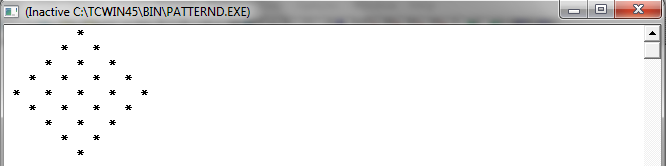
6:-Write a Program in C++ to generate a Diamond pattern using for loop.

Pattern is :-

                 *
               *  *
              * * *
             * * * *
            * * * * *
             * * * *
              * * *
               *  *
                 *

Coding:- 

#include<iostream.h>

                    main()
 {

                   int i, j,k,n;


 for(i=1;i<=5;i++)

 {

 for(j=1;j<=5-i;j++)

 cout<<"  ";
 for(k=1;k<=i;k++)

 cout<<" *  ";

 cout<<"\n";

 }

 for(i=5-1;i>=1;i--)
{

 for(j=1;j<=5-i;j++)

 cout<<"  ";
 for(k=1;k<=i;k++)

 cout<<" *  ";

 cout<<"\n";

 }

 }


Output:-