Tuesday, 7 April 2015

Write a Program in C++ to Calculate the area of the circle until radius entered is zero using While Loop.

:-Write a Program in C++ to Calculate the area of the circle until radius entered is zero using While Loop.


#include<iostream.h>
#include<conio.h>
#include<math.h>  // for pow() function

main()
{
  float radius, area;
  cout<<"\n Enter the radius(to terminate enter 0):";

  cin>>radius;
  while(radius !=0)
  {
area= 3.14*pow(radius,2);

cout<<"area is  : "<<area <<"sq. units \n";

getch();

 cout<<"\n Enter the radius(to terminate enter 0):";

 cin>>radius;

  }

}

The Output of this program :- 


Write a program in C++ for Simulation of a Simple Calculator using Switch Case.

:-Write a program in C++ for Simulation of a Simple Calculator using Switch Case.

#include<iostream.h>

void main()
{
  int a,b,o;
  float c;
  cout<<"\n enter the two operands: ";
  cin>>a>>b;

  cout<<"\n enter 1 for addition";
  cout<<"\n enter 2 for subtruction";
  cout<<"\n enter 3 for multiplication";
  cout<<"\n enter 4 for division";
  cin>>o;

  switch(o)
  {
case 1:      c=a+b;
cout<<c;
break;
case 2:      c=a-b;
 cout<<c;
break;
case 3:     c=a*b;
cout<<c;
break;
case 4:     c=a/b;
cout<<c;
break;

default :   cout<<"wrong choice";


  }

}
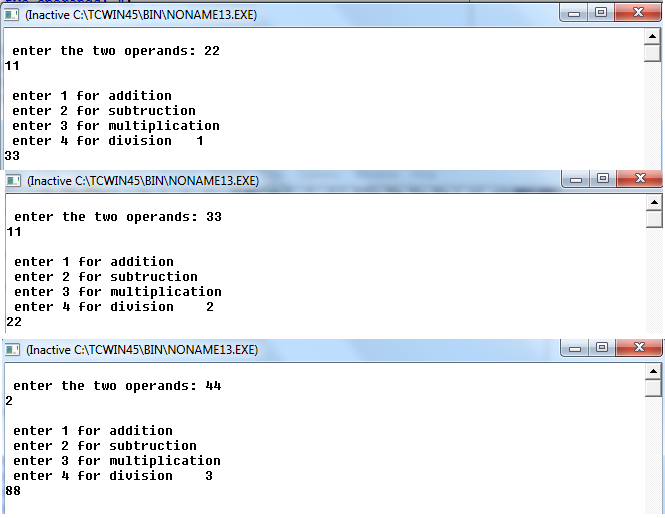
The Output of this Program :-


Write a program in C++ for Simulation of a Simple Calculator using Switch Case.

:- Write a program in C++ for Simulation of a Simple calculator using Switch Case .


#include<iostream.h>

void main()
{
  int a,b;
  char o;
  cout<<"\n enter the two operands: ";
  cin>>a>>b;

  cout<<"\n enter the operator (+,-,*,/)";
  cin>>o;

  switch(o)
  {
case '+': cout<<endl<<a<<'+'<<b<<"  =  "<<a+b;
break;
case '-': cout<<endl<<a<<'-'<<b<<"  =  "<<a-b;
break;
case '*': cout<<endl<<a<<'*'<<b<<"  =  "<<a*b;
break;
case '/': cout<<endl<<a<<'/'<<b<<"  =  "<<a/b;
break;
default : cout<<"\n wrong choice";


  }

}

The Output of this Program:-


Thursday, 19 February 2015

Write a Program in c++ to Print Number of Days in a Month using switch case.

Switch Case:- It tests a condition or control expression. According to this control expression the control is transferred to one of the several cases. The values of expression may be of type int and char but not of type float or double.

There are some points which we have to remembered when switch statement is used:-

- Always put a break statement after the case statement in a switch .

- Two case constants in a switch statement cannot have the same value, but the same statements can      be executive for two or more different case.

Here below a Program that will show you that how to print Number of Days in a Month using switch case.


#include<iostream.h>
#include<conio.h>
  main ()
  {
int n;
cout<<"enter the number of days";
cin>>n;

switch(n)
{

case 1:
case 3:
case 5:
case 7:
case 9:
case 10:
case 12: cout<<"there are 31 days ";
 break;
case 4:
case 6:
case 8:
case 11: cout<<"there are 30 days";
 break;
case 2: cout<<"there is only 28 days in this month";
break;
default: cout<<"invalid";

}
getch();
}

Output will be:-


Monday, 16 February 2015

Write a Program in C++ to calculate Sum and Multiplication of Two Numbers if first value is greater then 2nd otherwise Print 'Sorry'.

       In this Program you can see that this is the Program using if else. In which we have to Calculate the Sum of and the Multiplication of Two Numbers using if else Statement, if a is greater then b. Otherwise we have to Print Sorry if b is Greater then a.


        #include<iostream.h>
#include<conio.h>
main()
{
int a,b, sum, mul;

clrscr();

cout<<"enter the value";

cin>>a;
cout<<"enter the 2nd value";
cin>>b;
if(a>b)
{
 sum=a+b;
 mul= a*b;

 cout<<"sum is "<<sum;
 cout<<"\n mul is "<<mul;

 }

else
 {
cout<<"sorry";

 }
getch();


}


The Output will be


Saturday, 7 February 2015

Write a program in C++to Evaluate the Performance of a Student Using if- else- if statement.

Here we discussed about the Performance of a Student using if-else-if  Statement. Here the difference Conditions are evaluated from the start and when a Condition is evaluated as true, the following Statements are executed and the rest of the Statements are skipped.

#include<iostream.h>

#include<conio.h>

void main()

{
clrscr();

float marks, percentage ;


cout<<"enter the marks scored out of 700 ";

cin>>marks;

percentage = (marks/700)*100;

if(percentage>=90 && percentage<=100)
 {
 cout<<"\n Grade A";
}
else if(percentage>=80 && percentage<90)
{
cout<<"\n Grade B";
}
else if(percentage>=70 && percentage<80)
 {
cout<<"\n Grade C";
}
else if(percentage>100)
{
cout<<"\n The marks you have enterd are incorrect";
 }
else
{
cout<<"\n Grade D";

        cout<<"\n you have got Grade D  which is equivlant to fail in marks system";
}

}


OUTPUT OF THIS PROGRAM GRADE BY GRADE WILL BE :


Write a Program in C++ to Check the given Number for Even or Odd.

This is the another example for the Selection Structure. You know that performs one out of two Statements depending upon the Condition. Here this the Program to find out the number that which one is Even and which one is Odd Number.

#include<iostream.h>

#include<conio.h>

void main()


{
int num;

clrscr();

cout<<"enter the number";

cin>>num;

if(num%2 ==0)

{
cout<<"\n"<<num<<" is an even number";

}

else
{
cout<<"\n"<<num <<" is an odd number";

}

getch();
}

OUTPUT FOR ODD AND EVEN NUMBER WILL BE RESPECTIVELY :

FOR ODD NUMBER

FOR EVEN NUMBER